I need to create a table with a specific aspect. How did I create the table that I annexed to this message?
documentclass[11pt]article usepackagemathtools,float usepackageamstext usepackagebooktabs,tabularx usepackageragged2e begindocument begintable[H] centering begintabularc toprule & Para os 10 per'iodos & Medida (valor final)/ 10 per'iodos & Para um per'iodo & Medida (valor final) midrule hline M'edia & 14,04 & 14,04 & 1,404 & 1,40 hline Desvio Padr~ao & 0,095770401 & 0,10 & 0,0095770401 & 0,01 hline N contagens & 12 & 12 & 12 & 12 bottomrule endtabular endtable enddocument The first thing I would do is load geometry which will use slightly more sensible margins than LaTeX does by default. Since the table is too wide, you have a few options:
- make the text of the table smaller e.g. with
smallorfootnotesize; - rotate the table using options from, of example, the
rotatingpackage; - allow cells to break within columns;
- add notes to the table for supplemental information;
- reduce the spacing;
- some combination of two or more of the above.
(1) and (5) will make the table harder for readers. Especially, I would recommend not doing (5) and, if you do use (1), don’t do it to excess. small may be acceptable if you are using a reasonably sized font. tiny probably won’t be.
In the table below, I use (3) and (4). For (3), I use a tabularx environment consisting of one l column and four X columns. I then use (4) to move some information into a table note using threeparttable. Note that I don’t have much idea of the meaning as I don’t speak the language. So my selection is based purely on the punctuation and you may well wish to move something different into the notes. But this should at least demonstrate how to do that.
Follow the booktabs guidelines as these are good for at least 98% of cases, probably more:
toprule,midruleandbottomrule(+cmidruleif required in more complex tables);- no vertical rules;
- no double horizontal rules and, certainly, no
hlines.
toprule and friends are designed to replace hline etc. – they should not be used as well.
So these changes produce something like the following result:
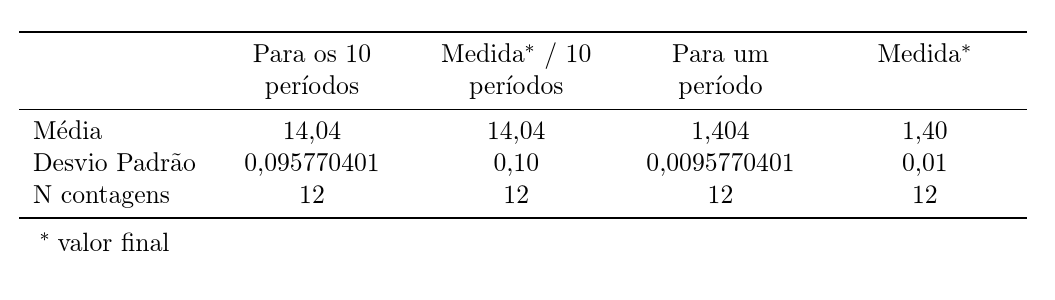
It would be better, really, if the numbers were aligned on the decimal point. However, I had better leave that to the siunitx experts as I can only manage it for very simple cases.
documentclass[11pt]article usepackagemathtools,float,geometry usepackagebooktabs,array,tabularx,threeparttablex begindocument begintable[H] beginthreeparttable begintabularxlinewidthl*4>centeringarraybackslashX toprule & Para os 10 per'iodos & Medidatnotetextasteriskcentered / 10 per'iodos & Para um per'iodo & Medidatnotetextasteriskcentered midrule M'edia & 14,04 & 14,04 & 1,404 & 1,40 Desvio Padr~ao & 0,095770401 & 0,10 & 0,0095770401 & 0,01 N contagens & 12 & 12 & 12 & 12 bottomrule endtabularx begintablenotes item[textasteriskcentered]valor final endtablenotes endthreeparttable endtable enddocument Some suggestions:
Use fewer significant digits – What information is conveyed by
0,0095770401which isn’t also conveyed by, say,0,009577?Keep using
cas the column type for the numbers in columns 2 to 5, but use a column type that allows automatic line wrapping for the text in the header cells. I suggest you employ atabularxenvironment, set its overall width totextwidth, and use a centered version of theXcolumn type for the 4 header cells.I see no need for the interior
hlinedirectives.
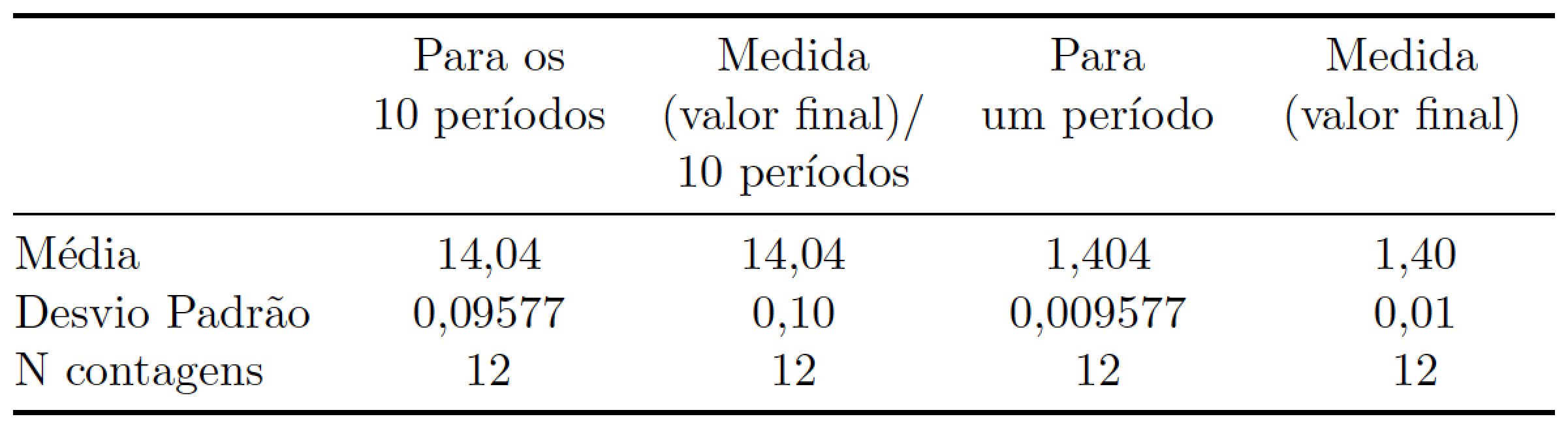
documentclass[11pt]article usepackage[portuguese]babel usepackagebooktabs,tabularx newcolumntypeC>centeringarraybackslashX newcommandmC[1]multicolumn1@C@#1 % handy shortcut macro begindocument begintable begintabularxtextwidth@ l cccc @ toprule & mCPara os 10~per'iodos & mCMedida (valor~final)/ 10~per'iodos & mCPara um~per'iodo & mCMedida (valor~final) midrule M'edia & 14,04 & 14,04 & 1,404 & 1,40 Desvio Padr~ao & 0,09577 & 0,10 & 0,009577 & 0,01 N contagens & 12 & 12 & 12 & 12 bottomrule endtabularx endtable enddocument How do I make this table? – tex.stackexchange.com #JHedzWorlD

No comments:
Post a Comment